Short answer
Readiness is Apple’s 0–10 score, new in watchOS 27 on Apple Watch Series 12 and Ultra 4. It combines three things: recent activity (active calories, workout effort ratings and Training Load), vitals compared with your own baseline (overnight heart rate, respiratory rate, wrist temperature, HRV and blood oxygen where available, plus daytime heart rate), and your Sleep Score. The result falls into four bands — Recover (0–1), Pace Yourself (2–4), Ready (5–7) and Go For It (8–10) — and updates through the day. It needs at least seven nights of sleep tracking in the past 49 to set a baseline. It cannot see what you ate, what you drank or the weather you ran in, so a low score after a hot run looks exactly like a low score after a hard week.
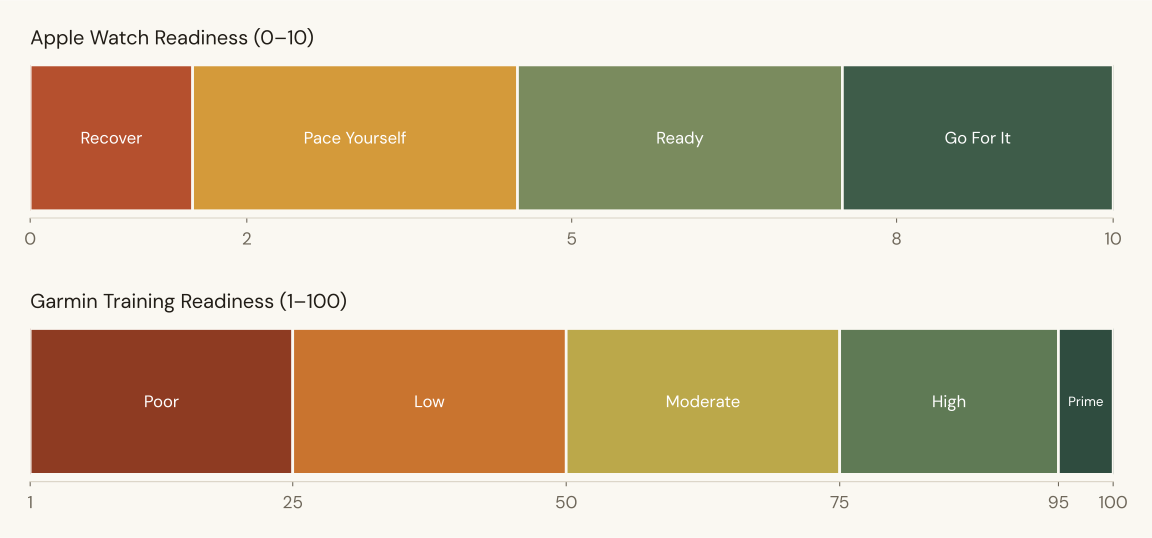
Apple has had every ingredient of a readiness score for years — overnight vitals, HRV, sleep tracking, Training Load — and left you to read them yourself. In watchOS 27 it finally adds them up. The result is good, and it is worth knowing exactly how it is built before you let it decide your Tuesday intervals.
What goes into it
Apple says Readiness analyses your recent activity, training load, vitals and Sleep Score, and that the algorithm was developed using data from the Apple Heart and Movement Study. In practice the inputs fall into three groups:
| Group | What it reads | How it moves the score |
|---|---|---|
| Activity | Active calories, workout effort ratings, Training Load | More recent activity lowers it; steady or reduced activity lets it rise. |
| Vitals | Overnight heart rate, respiratory rate, wrist temperature, HRV, blood oxygen where available; daytime heart rate | Each metric is compared with your baseline. Readings flagged as out of your usual range pull it down; typical or favourable ones lift it. |
| Sleep | Last night’s Sleep Score and recent sleep history | Short or broken nights lower it. |
Apple publishes no weights. What it does provide is transparency: the app shows which factors are driving today’s number, and you can tap into Activity, Vitals or Sleep to see the detail. Use that. The factor list is more useful than the score.
The hardware behind it
Readiness depends on the Health Sensing System in Series 12 and Ultra 4: redesigned optical and electrical heart sensors with larger green LEDs. Heart rate is now measured every five seconds all day, and HRV up to 24 times more often than before — as often as every five minutes. Apple splits HRV into two readings: Recovery HRV, for day-to-day stress and recovery, and Overall HRV, for longer-term cardiovascular health. Recovery HRV is the one feeding your overnight vitals and, through them, Readiness. That denser sampling is the reason older watches don’t get the feature; why your Apple Watch doesn’t have Readiness covers what they can do instead.
The four bands
| Score | Band | What it means for a runner |
|---|---|---|
| 8–10 | Go For It | Vitals typical or better, sleep good, load manageable. The day for the key session. |
| 5–7 | Ready | Train as planned. Most normal days live here. |
| 2–4 | Pace Yourself | Something is off. Easy running is fine; ask what changed before a hard session. |
| 0–1 | Recover | Several signals are out of range at once. Rest, and consider whether you are getting sick. |
Readiness can tell you that your body is off. It cannot tell you whether the cause was the run, the wine or the weather.
What it does well
It compares you with you. Every vital is judged against your own baseline, which is the approach the HRV research supports. Plews and colleagues showed that individual, rolling comparisons track adaptation far better than any single reading.
It sees illness early. Wrist temperature and respiratory rate are among the first things to move when you are coming down with something, and Garmin’s Training Readiness does not use either. A Pace Yourself morning with a raised wrist temperature and no hard training behind it is worth taking seriously.
It shows its working. The factor breakdown means you are never just handed a number. That puts it ahead of most readiness scores on the market.
What it cannot see
What you ate
Low glycogen after an under-fuelled long run is the most common reason a runner feels flat, and it barely moves overnight vitals until days of it have stacked up. How many carbs runners need is the number Readiness is missing.
Why your vitals moved
Two glasses of wine, a late dinner, a stressful day and the start of a cold all raise overnight heart rate and lower HRV. Readiness sees the effect and cannot name the cause. Alcohol and running shows how large the effect is.
The weather
A run in a 20°C dew point raises heart rate and effort without the muscular cost of a hard session, and Readiness counts it as load. Dew point for runners explains why the air matters more than the thermometer.
There is one more quirk worth knowing. Because Readiness updates through the day, active calories, naps and daytime heart rate all move it. Walk to lunch and your afternoon score can drop. Read the morning value for training decisions; treat the rest of the day as commentary.
Setting it up
Before your first score, set your height, weight and age in the Fitness app on iPhone, and turn on Activity, Sleep and Overnight Vitals. Apple says the baseline needs you to sleep with the watch on for at least seven of the past 49 nights. Readiness is available for people 13 and older, on the watch’s Readiness app, as a complication or Smart Stack widget, and in the Fitness app on iPhone.
How to use it
Read it the way you would read any recovery number: as a prompt, not an instruction. Look at the morning score, tap the factors, and ask what changed yesterday. If the answer is a hot run or a late night, train as planned. If the answer is nothing you can name and the score stays low for three days, back off. And when the score and your legs disagree, your legs know about muscle damage, which no wrist sensor does.
Your Apple Watch already sends HRV to Kovr. Kovr adds the why.
Apple Watch writes HRV, sleep, heart rate and workouts to Apple Health, so Kovr reads them automatically — nothing to log. Then it adds the three things Readiness cannot see: what you ate, what you drank and the temperature and dew point of every run. A Pace Yourself morning becomes “80g short on carbs after Sunday’s long run” instead of a number with no cause.
Download Kovr on the App StoreFree with a 14-day trial · Apple Watch, Garmin & Oura
Sources cited
- Apple (2026). Introducing Apple Watch Series 12 with the all-new Health Sensing System. Apple Newsroom — the Health Sensing System, Recovery and Overall HRV, and Readiness’s inputs and four bands
- Apple, the American Heart Association and Brigham and Women’s Hospital (2019). Apple Heart and Movement Study. Apple Research — the dataset Apple says the Readiness algorithm was developed with
- Plews, D.J., Laursen, P.B., Stanley, J., Kilding, A.E. & Buchheit, M. (2013). Training adaptation and heart rate variability in elite endurance athletes: opening the door to effective monitoring. Sports Medicine — individual, rolling HRV comparisons track adaptation better than single readings
- Buchheit, M. (2014). Monitoring training status with HR measures: do all roads lead to Rome?. Frontiers in Physiology — heart-rate measures respond to heat, illness, alcohol and load alike, and cannot separate them
Frequently asked questions
What is the Apple Watch Readiness score?
A 0–10 score in watchOS 27 that combines recent activity and Training Load, overnight and daytime vitals compared with your baseline, and your Sleep Score. It falls into four bands — Recover, Pace Yourself, Ready and Go For It — and updates through the day.
Which Apple Watches have Readiness?
Only Apple Watch Series 12 and Ultra 4. It relies on their new Health Sensing System, so Series 11 and earlier, Ultra 3 and earlier, and SE models do not get it, even on watchOS 27.
What does Apple Watch Readiness use to calculate the score?
Activity (active calories, workout effort ratings and Training Load), vitals (overnight heart rate, respiratory rate, wrist temperature, HRV and blood oxygen where available, plus daytime heart rate) compared with your baseline, and your Sleep Score and recent sleep history.
Why did my Readiness score drop during the day?
Readiness updates as new data arrives, so active calories, naps and daytime heart rate all move it. A walk or a stressful afternoon can lower it. Use the morning score for training decisions.
How long does Apple Watch Readiness take to work?
Apple says the baseline needs you to sleep with the watch on for at least seven of the past 49 nights, with height, weight and age set in the Fitness app and Activity, Sleep and Overnight Vitals turned on.
Is Apple Watch Readiness the same as Garmin Training Readiness?
No. Apple scores 0–10 from activity, vitals and sleep; Garmin scores 1–100 from sleep, HRV status, acute load, recovery time and stress history. The bands are not equivalent. Our comparison of the two covers the differences.